zoom_in Drag to zoom
Basic Computer Skills - Spring 2026
$60.00 / unit
This class is for first-time computer owners to learn basic computer concepts for off-line projects, safe/confident online applications, and more. (8 weeks, 16 hours)
Learning Objectives: To give students a better understanding of their system, so they can manage files and solve problems on their own.
First half of the semester: Computer Basics Introduction
- This noncredit course introduces basic computer fundamentals, keyboarding and basic Microsoft Word features in a Windows environment. Topics include basic Windows features, taskbar settings, computer operations, terminology, keyboarding and mouse features. Create and format a business letter and save files in folders and in multiple locations.
Meeting 1 Introduction, class goal, explore the computer's GUI. Meeting 2 Explore the file system and file types. Meeting 3 Using applications like Microsoft Word and LibreOffice. Meeting 4 Metadata, editing song file details, removing personally identifiable data such as GPS from photos. Meeting 5 Encryption and cybersecurity, signing messages, fingerprints. Meeting 6 Overview on the internet, how data is sent to servers, Domain Name System (DNS). Meeting 7 Online cloud services, such as Google Docs. Meeting 8 Exploring proxies, VPNs, internet censorship with explorer.ooni.org/internet and network server balance.
Student Learning Outcomes:
- Demonstrate basic computer and keyboarding functions to create and save a document.
- Create, organize and manage files and folders using basic Windows features and settings.
- Identify and define Internet dangers, and safety precautions.
- Demonstrate how to navigate the Internet to conduct an effective search using web browsers, search engines and bookmarks to manage and organize searches.
Click on the Drop-Down Menu to view the dates, times, and locations this class will occur on.
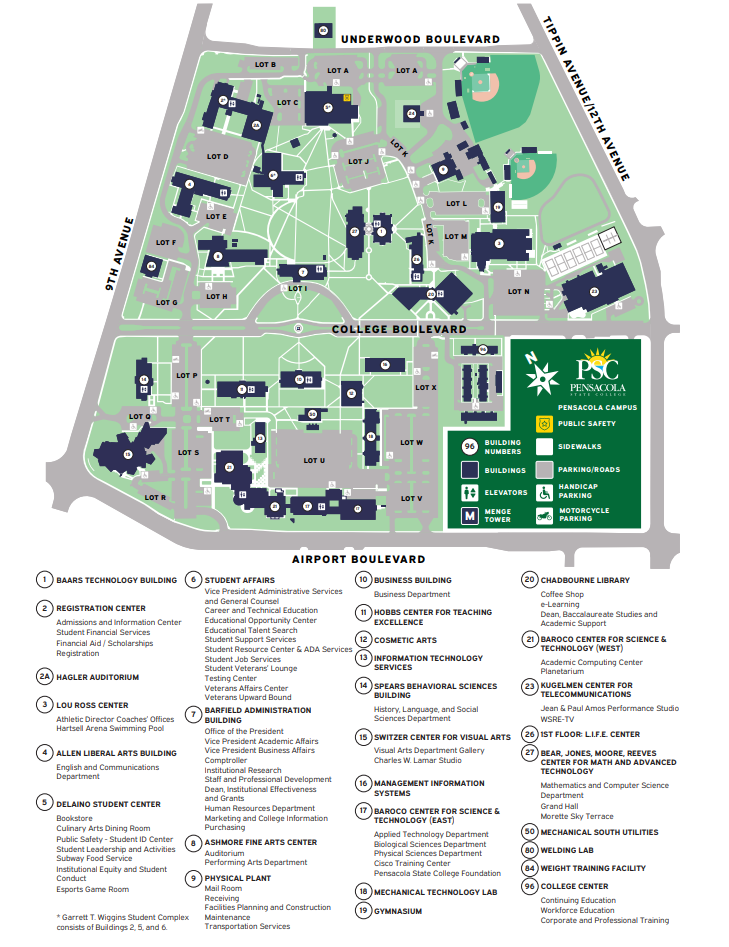
Link to Main Campus Map \ Link to Google Maps GPS
For inquiries, contact us at (850)-484-1797 or [email protected]. If you need guidance with registration and prefer to visit us in-person, come to our office in Building 96, Room 9612; we will provide guidance as you register with our guest computer.